Playing video from Surfsight SD cards

The SD cards in the Surfsight dash cameras have the ability to retain 100 hours of driving video. While retrieving the video from the web portal is limited to 4 minute video blocks, you can retrieve larger video blocks by physically removing the SD card from the camera to play on your computer. These are the instructions for retreiving video from the camera’s SD card.
The following are images of the components included in this process:
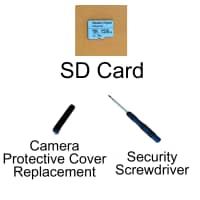
1. Power off the dashcam
To power off the dashcam:
When you are in the parked vehicle with the parking brake on, the ignition on, and the door closed, press the touchscreen of the dashcam to view the PIN screen.
Enter settings
Enter the default PIN 3333 to unlock the dashcam for the first time. If you have previously setup a custom pin, enter that pin.
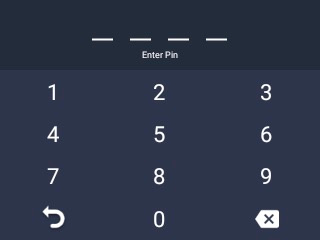
The screen unlocks and the menu appears.
Press Settings
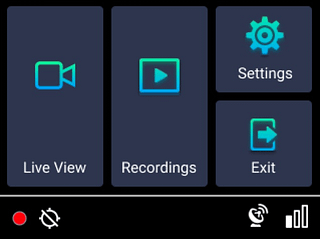
Scroll down and press Power Off.
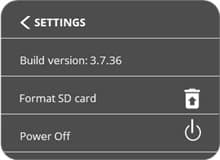
A confirmation window pops up.
Follow the instructions on the screen to first disconnect the power cable, and then press OK on the screen to power off the dashcam.
Complete this step in order to prevent the dashcam from restarting. If the dashcam does restart, repeat this step to avoid draining the battery.
If a tamper-proof case is installed on the dashcam, remove it before disconnecting the power cable.
Remove the SD card
To remove the dashcam SD card:
Use the security screwdriver included in the provided kit to remove the safety screws that lock the protective cover over the SIM and SD card slots.
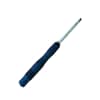
Security screwdriver
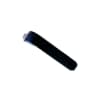
Protective Cover
Note: A magnet under the cover is used for detection. When the protective cover is opened, a tamper event is triggered.
Remove the SD card by gently pressing on it and releasing it. It should pop out.
Download data from SD card
To download data from the old SD card to a storage device:
Connect the SD card to a computer through the computer’s SD card slot, or an external SD card adapter. Your computer should detect the SD card automatically.
You can play the videos directly from the SD card, or copy the files from the SD card to a folder on your computer if you want to save them.
Any standard media player (i.e. Windows media player) can play the videos.
See the video resolution for the files saved on the SD card below.

Reinstalling the SD card in the camera
The following steps are required to restart the dashcam. It is important to keep the power plug in the dashcam when it restarts.
Press Power Off, and then OK. Abide by the instructions on the screen and do not remove the power plug. The device will restart.
Check for the red recording light at the bottom of the screen to verify the SD card is working.
Place the protective cover over the SD and SIM card slots.
Screw the cover into place using the safety screws and security screwdriver.